
Digital Bass Line (DB 303)1.11 - App Store
You'll be able to see results in few seconds.
Publisher Description
NEW LOW PRICE!
Digital Bass Line is the ultimate 303 emulator for the iPhone and iPod Touch.
Get this classic synthesizer emulation that has all of the characteristics of the original. From the growling bite of the oscillators at the low end to the sublime resonating screams at the high end, Digital Bass Line is a must-have for all electronic music lovers.
Armed with the passion to bring to life a virtual 303, we have gone to great lengths to recreate the ultimate acid machine. We used our very own vintage 303 as reference, running the machine through a battery of feature specific tests to better understand and emulate in our application. What we discovered is that the 303 is not just another subtractive monosynth as some may claim and we believe that our emulation captures its true expressive essence. Our emulation has nuances that only owners of a real 303 know such as what happens when all of the pattern steps are slides or how each parameter truly reacts to the tempo.
Not only does Digital Bass Line give you a full featured virtual analog synthesizer, it also gives you two versatile effects stomp boxes to bring more life to your bass lines.
The easy and intuitive design makes creating bass lines fun and quick, whether you are a veteran of analog and digital synthesizers, or a newcomer to electronic music.
Find out for yourself what this little silver app is capable of.
Download the owner's guide and view "How-to" videos at www.pulsecodeinc.com/db-303
For best results, please use high quality headphones or external monitor speakers.
____________________
Features:
Virtual Analog Bass Line Synthesizer Emulation
Precise oscillator emulation (not a simple waveform, but a true emulation of the analog circuitry)
Classic analog style low pass filter finely tuned to a real 303
Internal sequencer which has all of the features of the classic, but with a quick and easy programming interface
Envelope Modulation and Accent to really make your bass lines expressive
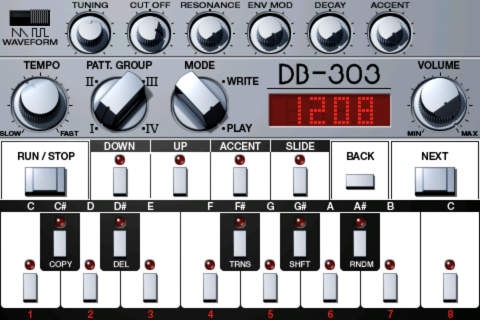
Stunning visual representation of a 303 style synthesizer meticulously designed and 3D modeled from the real thing
Virtual knob controls which precisely track your finger touch
Additional Functions:
Random pattern generator that will instantly program incredible bass lines for you!
Group 1-8 patterns in to play back as a loop
Transpose Pattern
Shift Pattern
Copy Pattern
Delete Pattern
Tempo range from 40-240 beats per minute
Automatic memory save if application is interrupted or exited
Integrated Stomp Box Style Effects Units:
Distortion
Extremely harsh distortion tuned to make your Digital Bass Line scream!
Tone control to add extra fatness or shimmering highs
Level control for precise control of audio output
Delay
up to 1000ms variable delay time
Feedback amount for adding extra depth and echoes to the delay
Mix control for blending delay output with input signal
I ACID
Requires iOS 4.0 or later. Compatible with iPhone, iPad, and iPod touch.
About Digital Bass Line (DB 303)
The company that develops Digital Bass Line (DB 303) is Pulse Code, Inc.. The latest version released by its developer is 1.11.
To install Digital Bass Line (DB 303) on your iOS device, just click the green Continue To App button above to start the installation process. The app is listed on our website since 2010-07-29 and was downloaded 0 times. We have already checked if the download link is safe, however for your own protection we recommend that you scan the downloaded app with your antivirus. Your antivirus may detect the Digital Bass Line (DB 303) as malware if the download link is broken.
How to install Digital Bass Line (DB 303) on your iOS device:
- Click on the Continue To App button on our website. This will redirect you to the App Store.
- Once the Digital Bass Line (DB 303) is shown in the iTunes listing of your iOS device, you can start its download and installation. Tap on the GET button to the right of the app to start downloading it.
- If you are not logged-in the iOS appstore app, you'll be prompted for your your Apple ID and/or password.
- After Digital Bass Line (DB 303) is downloaded, you'll see an INSTALL button to the right. Tap on it to start the actual installation of the iOS app.
- Once installation is finished you can tap on the OPEN button to start it. Its icon will also be added to your device home screen.
Program Details
System requirements
Download information
Pricing
Version History
version 1.11
posted on 2010-07-29
Disclaimer
Official App Store Link
We do not host Digital Bass Line (DB 303) on our servers. We did not scan it for viruses, adware, spyware or other type of malware. This app is hosted by Apple and passed their terms and conditions to be listed there. We recommend caution when installing it.
The App Store link for Digital Bass Line (DB 303) is provided to you by apps112.com without any warranties, representations or guarantees of any kind, so access it at your own risk.
If you have questions regarding this particular app contact the publisher directly. For questions about the functionalities of apps112.com contact us.
